Mugula › Disappearing photos on iPhone
How to send disappearing photos on iPhone
Short answer: iMessage can't do it on its own. Messages has no timer for photos, so anything you send stays in the thread until someone deletes it. Here's how to add one without moving your friends to a new app.
Free on iPhoneGet Mugula, freeSend a disappearing photo in iMessage
- Install Mugula from the App Store. It adds itself to the Apps row in Messages.
- Open the conversation or group you want, then tap the Apps button beside the text field and choose Mugula.
- Take the photo or video. Add a filter, a caption or a doodle if you like.
- Open send options and pick the rules: Visible sets how long it shows once opened (as short as one second), Disappears sets when it expires from the chat, and Blur preview hides it until they tap.
- Send. Your friend taps the bubble to view it. If they don't have Mugula yet, the App Store opens for them.
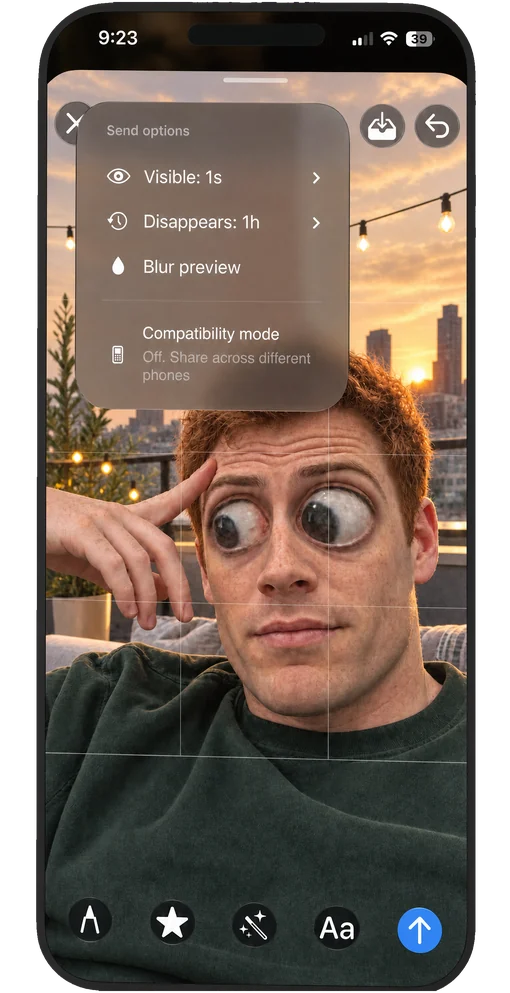
Your options compared
| Works in iMessage | Needs an account | Photo timer | |
|---|---|---|---|
| Messages on its own | Yes | No | No |
| Mugula | Yes | No | Yes |
| WhatsApp, Telegram, Instagram | No, own app | Yes | View once |
If everyone you talk to already lives in one of those apps, their view-once photos are a fine choice. If your friends are in iMessage, Mugula saves moving them.
Questions
Does iMessage have disappearing photos?
No. Messages on iPhone has no view-once or timer option for photos, and a photo you send stays in the conversation until someone deletes it.
How do you send a disappearing photo on iPhone?
Use an app that adds a timer. With Mugula, open the conversation, tap the Apps button, choose Mugula, take the photo, set the timer in send options and send it.
Can the other person screenshot it?
On any phone, someone can photograph a screen. Disappearing photos stop a picture from sitting in the chat forever; they cannot stop a determined screenshot. Only send what you are comfortable with.
What about WhatsApp, Telegram and Instagram?
Each has its own view-once photos, but only inside that app and only with people who use it. Mugula works in the Messages chats you already have.
Your group chat just got a camera
free, no account, works in the chats you already have
Free on iPhoneDownload on the App Store