Mugula › iMessage camera filters
Funny face filters for iMessage
live, free, right in the chat
Mugula adds a camera to Messages with face filters that track you as you move: big eyes, wide mouth, tiny head and more. Draw on top, add stickers and a caption, then send it to the group.
Free on iPhoneDownload on the App Store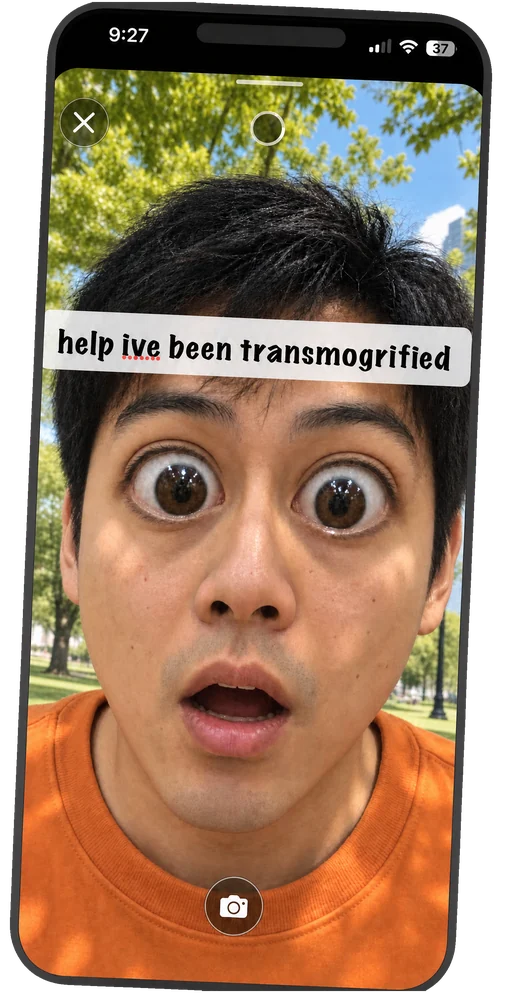
Live filters
Face effects that follow you in real time, on photos and videos.
Doodles and stickers
Pen, pencil and marker in any color, emoji and animated stickers, captions in several fonts.
Video effects
Voice changers and time effects: slow motion, speed up, reverse, boomerang.
Questions
Does iMessage have camera filters?
The built-in Messages camera has a few effects and Memoji. For face filters that warp your face live, plus doodles, stickers and disappearing photos, add an iMessage app like Mugula.
How do I add an app to iMessage?
Install it from the App Store, then in any conversation tap the Apps button beside the text field. Mugula appears in the list; you can drag it near the top.
Do filters work on video?
Yes. Filters run live while you record, and video can also get voice effects like Deep, Chip and Robot, plus slow motion, reverse and boomerang.
Your group chat just got a camera
free, no account, works in the chats you already have
Free on iPhoneDownload on the App Store